
Automated Bank Statement Processing and Google Drive Filing with Zapier
Daily bank statements previously had to be downloaded from email, sorted by account type, and uploaded to monthly Google Drive folders manually. Gmail rules and Zapier automations now identify each account, save the correct attachments automatically, and provide the bookkeeper with organized monthly records, reducing repetitive administrative work and supporting faster financial reconciliation.
CASE STUDYPROFESSIONAL SERVICESFINANCIAL OPERATIONS
4 min read
Overview
A company needed a more efficient way to collect, organize, and store daily bank statements for bookkeeping.
Bank statements were delivered as email attachments for multiple local and foreign currency accounts. Each attachment had to be downloaded, identified, sorted by account type, and uploaded to the correct monthly folder in Google Drive.
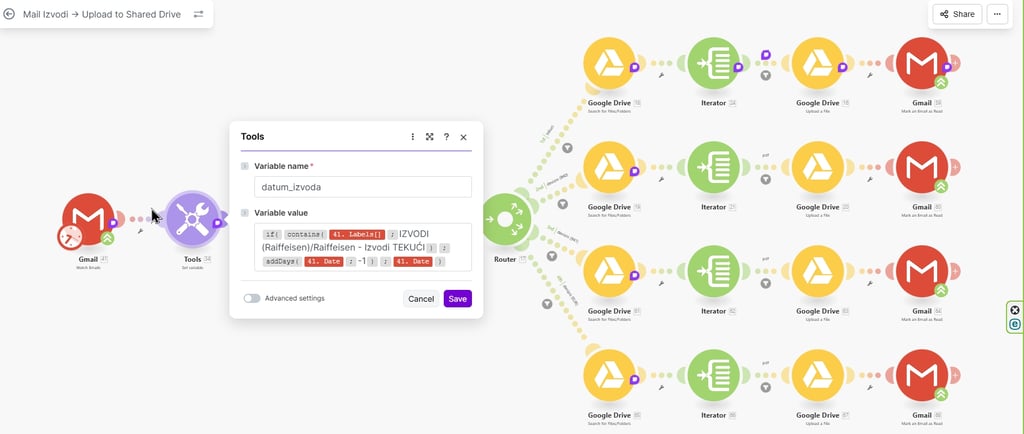
We developed an automated bank statement management system using Gmail, Zapier, and Google Drive. The automation identifies each bank account, extracts the statement date, finds or creates the appropriate monthly folder, and uploads the document without manual intervention.
The result is a consistent and scalable document management workflow that keeps financial records organized and ready for month-end bookkeeping.
The Challenge
The company received daily bank statements by email. Managing these documents involved several repetitive steps:
Opening each bank statement email
Downloading the attachment
Identifying the relevant bank account
Locating the correct Google Drive folder
Creating a new monthly folder when needed
Uploading the statement to the correct location
Checking that no statements were missing or stored incorrectly
Because the company managed both local and foreign currency accounts, each statement also needed to be separated by account type.
Although each individual task was simple, repeating the process every day required time and created opportunities for documents to be overlooked, duplicated, or saved in the wrong folder.
The company needed a workflow automation solution that could manage incoming bank statements from email and organize them in Google Drive automatically.
The Solution
We created separate Zapier automations for each bank account type.
Gmail filters identify incoming bank statement emails based on information in the subject line, such as the relevant bank account number. Gmail then applies a dedicated label for the local or foreign currency account.
The assigned Gmail label triggers the appropriate Zapier workflow.
The automation then:
Retrieves the bank statement attachment from the email.
Reads the statement date.
Extracts the month from that date.
Searches the relevant Google Drive location for a folder named after that month.
Uses the existing folder when a matching folder is found.
Creates a new monthly folder automatically when no match exists.
Uploads the bank statement to the correct folder.
This dynamic folder management removes the need to manually create monthly folders or update folder paths in Zapier at the beginning of each month.
Automated Workflow
1. Bank statement emails arrive in Gmail
The bank sends daily account statements as email attachments.
Gmail rules review the subject line and categorize each email according to the bank account number.
For example:
Emails containing the local currency account number receive the Local Bank Account label.
Emails containing the foreign currency account number receive the Foreign Bank Account label.
2. The Gmail label triggers Zapier
Each account type has a separate Zapier automation.
When Gmail applies the relevant label, Zapier starts the corresponding workflow and retrieves the statement attachment and email data.
3. The automation identifies the statement month
Zapier obtains the statement date and extracts the month.
The extracted month is used as the folder name and determines where the document should be stored.
4. Zapier searches for the monthly Google Drive folder
The automation searches the appropriate Google Drive account folder for a subfolder matching the extracted month.
If the folder already exists, Zapier selects it as the destination.
5. A new folder is created when needed
If Zapier cannot find a matching monthly folder, it automatically creates one using the extracted month as the folder name.
This allows the workflow to continue operating when a new month begins without requiring changes to the automation.
6. The statement is uploaded automatically
The bank statement attachment is uploaded to the identified or newly created folder.
Documents remain separated by bank account type and organized by month.
7. The monthly folder is shared with the bookkeeper
At the end of the month, the relevant Google Drive folder can be shared with the bookkeeper.
The bookkeeper receives a complete, organized collection of bank statements for reconciliation and financial reporting.
Results
Reduced manual document handling
The company no longer needs to download, sort, and upload bank statement attachments every day.
Fully automated monthly folder creation
The system automatically finds the correct monthly folder or creates a new one when the month changes. No monthly folder setup or Zapier path update is required.
Better organization of financial documents
Bank statements are consistently organized by account type and month, making records easier to locate, review, and share.
More reliable bookkeeping preparation
The bookkeeper receives structured monthly folders containing the relevant statements, which supports a smoother reconciliation process.
Lower risk of filing errors
Using email rules, account-specific workflows, and date-based folder selection reduces the possibility of statements being stored in the wrong location.
Scalable document management
The workflow can continue operating across new months without manual configuration. Similar automations can also be created for additional bank accounts or financial documents.
Tools and Integrations
Gmail
Gmail receives the bank statement emails and applies labels based on account information found in the subject line.
Zapier
Zapier connects Gmail and Google Drive. It retrieves attachments, processes statement dates, searches for folders, creates missing folders, and uploads files.
Google Drive
Google Drive serves as the central document storage system, with statements organized into account-specific and monthly folders.
Business Impact
This workflow automation replaced a repetitive daily administrative process with a structured document management system.
Instead of relying on someone to download and file each statement manually, the company now has an automated process that responds to every incoming bank statement, determines where it belongs, and stores it correctly.
The solution saves administrative time, improves document consistency, and ensures financial records remain organized throughout the year.