
Streamlining a Complex Client Onboarding Process with ClickUp, Make, Zapier, and GoHighLevel
See how a digital marketing company reduced client onboarding time by 87% using ClickUp, Make, Zapier, GoHighLevel, Google Drive, and contract automation.
CASE STUDYDIGITAL MARKETINGPROFESSIONAL SERVICES
7/8/20266 min read
Brief Overview
A digital marketing company serving professional service firms needed to reduce delays and manual work in its client onboarding process. Roadmap Consulting analyzed the existing workflow, identified data gaps and automation opportunities, and connected the company’s contract, CRM, task management, form, and document storage systems. The redesigned process reduced average onboarding time from 15 days to 2 days, representing an 87% improvement, while also increasing data consistency and enabling the team to onboard more clients without adding resources.
Client Background
The client is a digital marketing company that provides specialized marketing and lead generation services to professional service firms.
Its onboarding process involved several teams and systems, including sales, contract management, client records, CRM communication, onboarding forms, document storage, and service setup.
Because each new client needed to provide detailed business and service information before delivery could begin, a reliable onboarding process was essential.
However, the existing process depended heavily on manual communication, data entry, and follow-up.
The Challenge
The company was experiencing significant delays and inconsistencies during client onboarding.
In some cases, it took up to 15 days from contract signing to complete the onboarding process and begin service delivery.
The main challenges included:
Manual onboarding activities
Team members manually transferred information between the contract platform, ClickUp, the CRM, Google Drive, and onboarding forms.
This increased the administrative workload and slowed down the start of client services.
Long onboarding times
Clients did not always complete the onboarding form promptly.
The team had to send follow-up messages manually, monitor responses, and check whether all required information had been submitted.
These delays extended the onboarding process to as long as 15 days.
Inconsistent client data
The same client information was stored across several systems.
Without automation, contact details, fees, selected services, contract dates, and other information could be entered differently or remain incomplete.
Fragmented workflows
The contract platform, ClickUp, Google Drive, GoHighLevel, and the onboarding form did not operate as one connected process.
Team members had to review several tools to determine the client’s current onboarding stage and identify the next action.
Limited progress visibility
The onboarding team did not have a centralized view of all completed and outstanding steps.
This made it harder to track progress, follow up with clients, and ensure services started on time.
Technical Challenges
The automation also needed to address two important technical limitations.
Email used as the unique client identifier
The client’s email address was used to match records across the contract platform, ClickUp, GoHighLevel, and the onboarding form.
However, clients sometimes used different personal and business email addresses across these systems.
When the email addresses did not match, the automation could not reliably identify the correct record.
ClickUp form and list limitations
ClickUp forms had to submit information to a dedicated onboarding list.
Returning clients already had records in the company’s main client database, which created the possibility of duplicate or disconnected tasks.
The workflow needed to determine whether a client was new or returning before deciding whether to create a new record or update an existing one.
The Solution
Roadmap Consulting reviewed the full onboarding workflow, mapped the required data inputs, and identified which manual steps could be automated.
A connected onboarding system was then created using Foxit, Zapier, ClickUp, Google Drive, GoHighLevel, and Make.
The redesigned process focused on:
Capturing contract information automatically
Identifying new and returning clients
Creating or updating client records in ClickUp
Organizing client documents in Google Drive
Updating the CRM and launching follow-up reminders
Monitoring onboarding form submissions
Flagging email mismatches for manual review
Contract Signing Automation
The onboarding process began when a client signed a service agreement in the contract management platform.
Zapier monitored signed documents and filtered the results to ensure the workflow only continued when the correct contract template was completed.
The automation then extracted the client’s email address and used it to search the ClickUp client database.
This search determined whether the client was new or had previously worked with the company.
Workflow for Returning Clients
When the email address matched an existing client record, Zapier updated the current ClickUp task rather than creating a duplicate.
The automation added or updated information such as:
Contract signing date
Selected products or services
Current fees
Contact information
Updated agreement details
This allowed the company to preserve the client’s existing record and maintain a complete history in one location.
Workflow for New Clients
When no matching record was found, the system treated the client as new.
The automation then:
Created a dedicated client folder in Google Drive
Created a new task in the ClickUp client database
Added the client’s contact information
Added service and fee details
Added a link to the Google Drive folder
Uploaded the signed contract to the ClickUp task
This created a complete initial client record without requiring the onboarding team to enter the same information manually in several places.
CRM Update and Automated Reminders
The automation also searched for the client in GoHighLevel.
Depending on whether the contact already existed, the system either created a new CRM contact or updated the current one.
A dedicated onboarding tag was then applied.
This tag placed the client into an automated communication sequence that reminded them to complete the onboarding form.
The reminder sequence reduced the need for the team to follow up manually with every client.
Personalized Welcome Communication
The salesperson sent a personalized welcome email containing the link to the onboarding form.
Keeping this message personal allowed the company to maintain a direct relationship with the client while automation handled the supporting administrative steps.
The automated reminder sequence continued until the required onboarding information was submitted.
Onboarding Form Processing
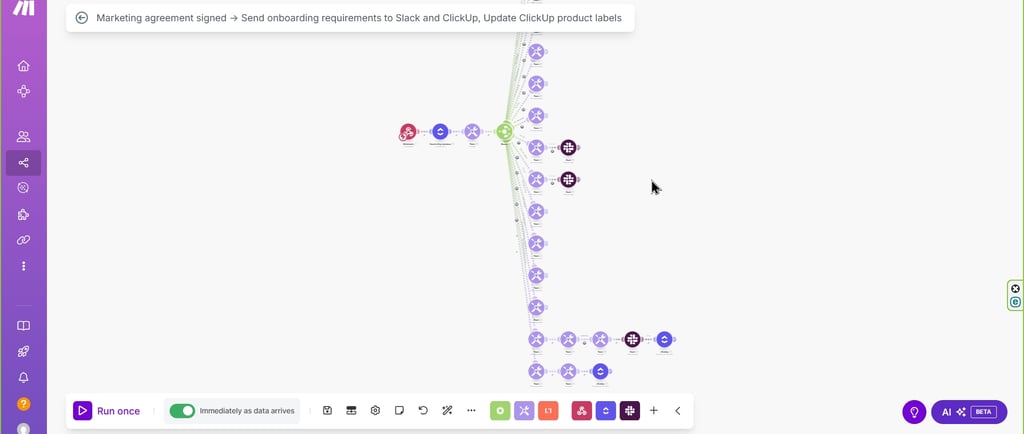
When the client submitted the onboarding form, a Make automation searched ClickUp for the matching task in the onboarding list.
The automation then matched the form submission with the corresponding client record using the email address.
When a successful match was found, the workflow updated the relevant systems and removed the onboarding reminder tag from GoHighLevel.
Removing the tag stopped any remaining reminder messages because the client had completed the required action.
Email Mismatch Handling
Because clients occasionally used different email addresses, the workflow included an exception process.
When the email submitted through the onboarding form did not match the email stored in ClickUp or GoHighLevel, the automation sent a notification to the responsible manager.
The manager could then:
Confirm the client’s identity
Review the different email addresses
Update the CRM record
Correct the ClickUp information
Complete the match manually
This prevented the automation from updating the wrong client record and gave the team a clear way to manage exceptions.
Redesigned Client Onboarding Workflow
The optimized onboarding process followed these steps:
1. The client signs the service agreement
The contract platform records the signed agreement and triggers Zapier.
2. The automation confirms the contract type
Zapier checks that the signed document uses the correct agreement template.
3. The system searches the ClickUp client database
The client’s email address is used to determine whether the client is new or returning.
4. An existing record is updated or a new record is created
Returning clients remain connected to their existing ClickUp records.
New clients receive a ClickUp task and a dedicated Google Drive folder.
5. Contract and service information is stored
The signed agreement, fees, contact details, services, and relevant links are added to the ClickUp client record.
6. The CRM contact is created or updated
The client is added to or updated in GoHighLevel.
7. The onboarding reminder sequence begins
An onboarding tag starts an automated follow-up sequence that reminds the client to complete the form.
8. The salesperson sends a welcome email
The client receives a personalized message and a link to the onboarding form.
9. The client submits the onboarding form
Make searches ClickUp and the CRM for the matching client record.
10. Automated reminders are stopped
When the email address matches, the onboarding tag is removed and the reminder sequence ends.
11. Email mismatches are flagged
If the email addresses do not match, the responsible manager receives a notification and completes a manual review.
Results
87% reduction in onboarding time
The average onboarding period decreased from 15 days to 2 days.
This allowed new clients to begin receiving services much sooner.
Improved data consistency
Automated data transfer reduced repeated manual entry and helped keep client information consistent across ClickUp, Google Drive, the CRM, and the contract platform.
Reduced administrative work
The onboarding team no longer needed to create every client record, folder, CRM contact, reminder sequence, and document link manually.
Faster client follow-up
Automated reminders encouraged clients to complete the onboarding form without requiring repeated manual messages from the team.
Better client record management
The workflow distinguished between new and returning clients, reducing duplicate records and preserving existing client histories.
Improved onboarding visibility
ClickUp provided a centralized location for contract details, service information, fees, files, and onboarding progress.
Greater onboarding capacity
Because the workflow reduced manual effort, the company could onboard more clients without adding additional team members.
More reliable exception management
Email mismatches were flagged automatically, allowing managers to resolve data issues before the wrong client record was updated.
Business Impact
The company moved from a fragmented and time-consuming onboarding process to a connected system that coordinated contracts, client records, documents, CRM communication, and form submissions.
Automation reduced delays while still allowing the sales team to maintain personal communication with new clients.
The onboarding team gained more reliable data, clearer progress tracking, and fewer repetitive administrative tasks. Clients could begin receiving services sooner, improving both customer experience and operational efficiency.
The redesigned workflow also created a scalable foundation that can support higher onboarding volumes as the company grows.